
















We run an affiliate program for our SaaS Placid, where our partners can earn recurring commissions for referrals and get payouts. As we're based in the EU, that isn't just "send the money": for each payout we owe the affiliate a credit note (a Gutschrift) — a self-billing document we issue on their behalf. It has to include their legal address, a sequential invoice number, and the commission period it covers. (Please keep in mind we don't provide any tax advice in this article!)
Done by hand, creating the paperwork for a payout looks like this: We have to open the affiliate dashboard, copy the billing address, copy the payout address, paste both into a template or invoicing app, work out which months this payment covers, bump the invoice number, export a PDF, and file it somewhere. Then repeat per affiliate, for every payout.
Yeah, no thanks. That's something we needed to automate! I'm going to walk you through how we did this and what tools we used.
Workflow overview
Our workflow connects three tools: Our affiliate management software Tapfiliate, a self-hosted Baserow table, and the Placid PDF automation API.
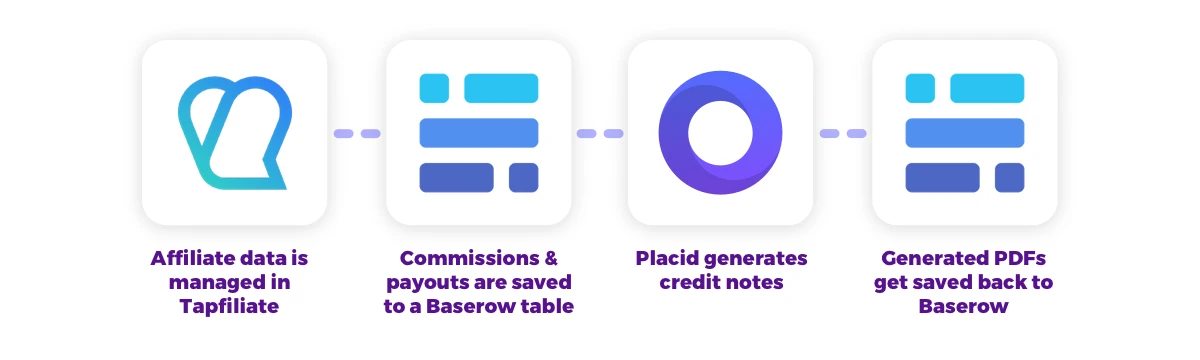
Placid affiliates register with Tapfiliate, which automatically tracks the commissions they earn and lets us manage payouts.
The workflow creates a data snapshot from the platform first: We save one row per earned commission per affiliate, and one row per payout into a Baserow table. This table is also used directly by our accountant, who is able to build balances per quarter and file our outstanding obligations correctly. From the Baserow data, we're generating the credit note PDFs with our own PDF automation API via Placid, saving it back to the correct payout row.
This is how our credit notes look like in the end, with dynamic payment data:
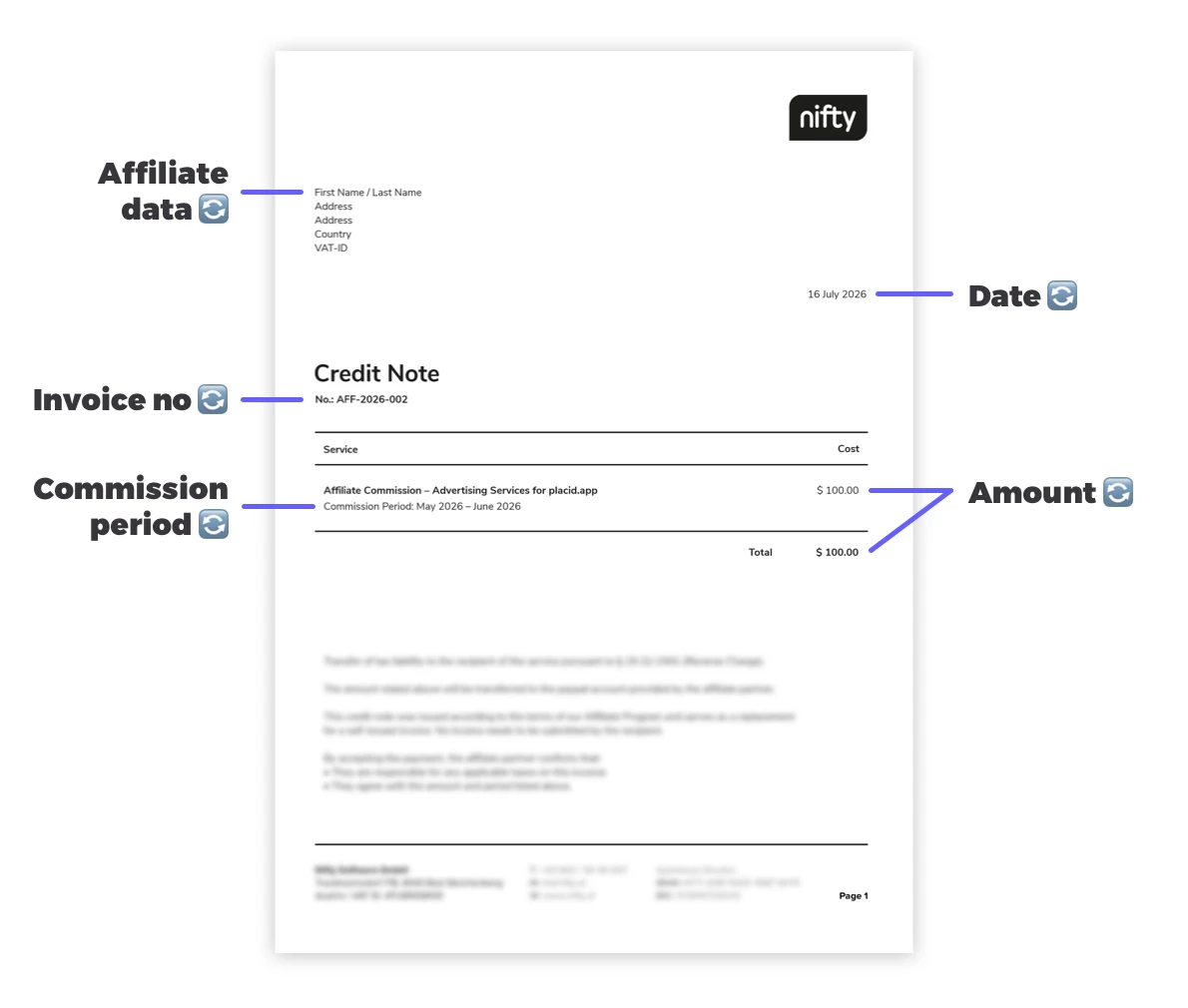
For this automation, we don't use any other database. The automation is basically just a thin layer between the Tapfiliate, Baserow and Placid REST APIs. For us, this layer is a super small, local Laravel app that lets us navigate the workflow via some CLI commands. But Laravel is just our preference - you (or your coding agent) could spin that up with any tech stack.
So structurally, we have:
- One source of truth – the affiliate platform. It knows what we owe, the affiliate's billing address, and their payout address. If any of these infos are wrong, it gets fixed at the source, not in the invoice.
- A ledger – a table with one row per financial event: commission earned (+) and payout (-). The payout row is the anchor - it carries the invoice number, the data snapshot, and ends up carrying the credit note PDF itself.
- A PDF renderer – Something that fills a PDF template with the data.
Even if your tools and tech stack might be different, you can transfer the principles to your own workflow.
Export commissions and payouts
The first step in the workflow is to export all financial events (new commissions earned, new open payouts) from Tapfiliate to our Baserow table. We save the following data for each row:
- The date the financial event occured
- The affiliate ID from Tapfiliate
- A unique reference composed by date (month) and affiliate ID (making sure we have only one commission row per affiliate per month, no duplicates allowed)
- The type of event: Commission or payout
- The affiliate data as a freshly snapshotted JSON object, containing their name, address, and Paypal email address
- Currency & amount of the event (
77.95for a commission earned,-258,49for a payout) - The invoice number (created manually by us, rendered onto the credit note later) and the invoice PDF itself (empty until generated)
Create dynamic PDFs
Now that we have all data we need, we can go on to generate the credit note PDFs.
For these dynamic documents, we designed an invoicing template in Placid once. Itʼs a 2480 x 3508 px A4 document with our company header and footer as a fixed page frame, and some dynamic layers on the page. These layers are going to render the affiliate partnerʼs details and payout data from the Baserow table.
| Layer | What goes in | Example |
|---|---|---|
recipient |
address block + payout address + affiliate ID | Bright Loop Media / 12 Main St / 00-001 Warsaw, Poland / PayPal: pay@brightloop.example |
date |
payout date, human-formatted | 15 June 2026 |
invoice-no |
sequential number | AFF-2026-0126 |
service-title / service-description / service-cost |
what the payout covers, the derived period, and the amount | Affiliate commission / Commission period: April 2026 – June 2026 / $201.42 |
total |
formatted total | $201.42 |
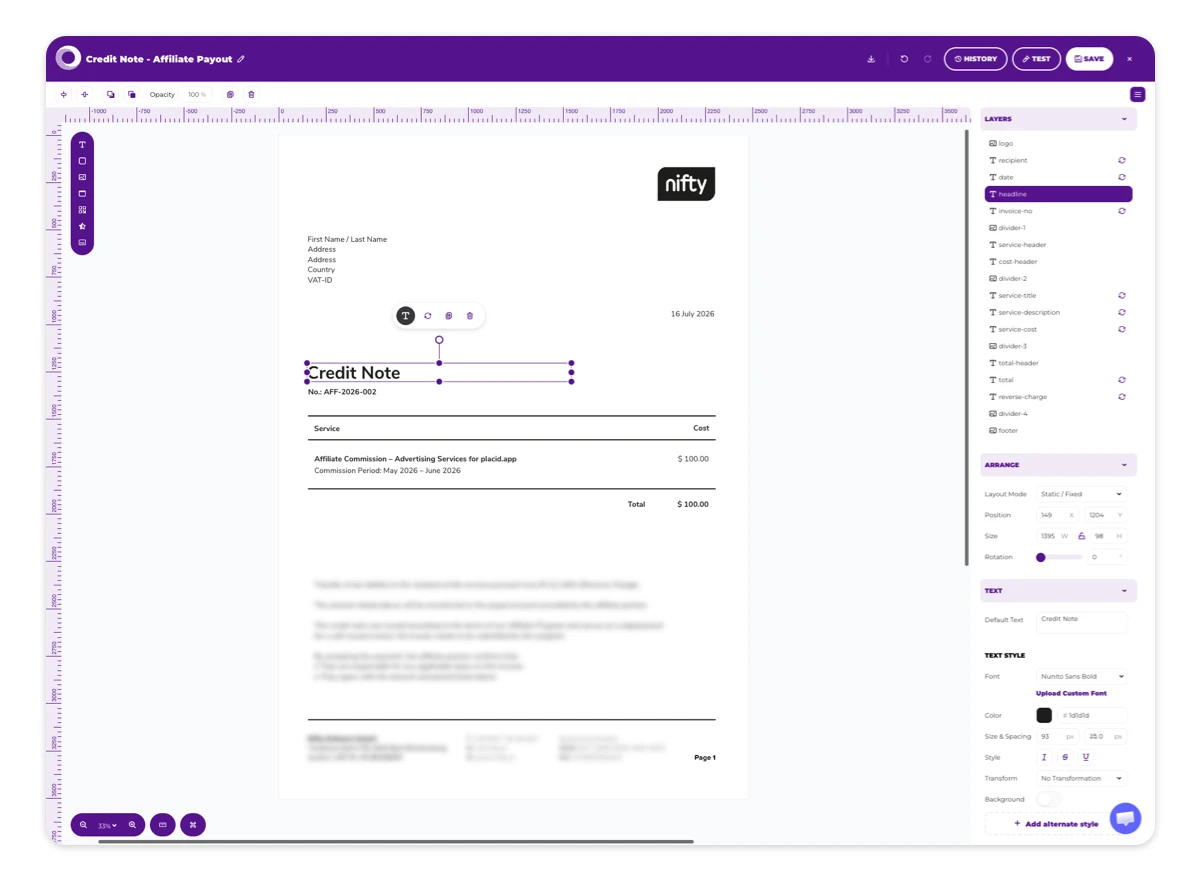
Some of this data can be used from the Baserow table as is (like the invoice number), some of it has to be formatted or composed first (like calculating the commission period).
The API call for the PDF is just one request with a pages array, where each page is a template (in our case just one) plus its layer data.
{
  "pages": [
    {
      "template_uuid": "your-credit-note-template",
      "layers": {
        "recipient": {
          "text": "Bright Loop Media<br>12 Main St<br>00-001 Warsaw, Poland<br>PayPal: pay@brightloop.example<br>Affiliate ID: AF-2043"
        },
        "date":                { "text": "15 June 2026" },
        "invoice-no":          { "text": "AFF-2026-0126" },
        "service-title":       { "text": "Affiliate commission" },
        "service-description": { "text": "Commission period: April 2026 – June 2026" },
        "service-cost":        { "text": "$201.42" },
        "total":               { "text": "$201.42" }
      }
    }
  ],
  "modifications": {
    "filename": "AFF-2026-0126"
  }
}
The layers take basic markup like line breaks with <br> or \n, so our recipient layer can hold a formatted multi-line block instead of five separate layers.
The rendering is async: We get back a job ID, poll until it reports finished, and receive a hosted PDF URL.
{ "id": "pdf_9f2c…", "status": "queued" }The queue-and-poll design makes sure that a slow render never blocks or times out the thing that asked for it. The returned PDF is a plain URL, which makes it easy to file away. We save the correctly named file (AFF-2026-0126.pdf) to the invoice PDF column of the payout rows of the Baserow table.
Tips to make automated invoices trustworthy
Invoices are important business documents. You want to make sure everything is filed correctly, especially here in the EU. We put a lot of thought into making the generated credit notes predictable, correct and ready to hand over to our accountant. Steal these tips to add some safeguards to your workflow!
🧊 Snapshot the data before you render
We always freeze the affiliate's record (name, billing address, Paypal email etc) from our affiliate platform, saving the data as a JSON object in the payout row. The PDF is then rendered from that frozen snapshot, never from live data.
The invoice needs to be a reproducible record of a moment in time. If our affiliate partner moves their office to a new address next year, we want the credit notes from last year to still be rendered with the old address if we regenerate them for any reason.
🔄 Make every step idempotent
We made sure we can re-run the whole chain any time and it does nothing to work already done:
- Every payout row has a unique reference (date + affiliate); a duplicate is refused.
- The snapshot step only fills rows whose snapshot is empty.
- The render step only renders rows whose PDF field is empty.
Presence of data is the state. To regenerate a document, we only need to clear the row's PDF field and re-run the workflow.
📦️ File the document on the row that caused it
Our renderer Placid hands back a URL, and it's saved in a file field in the payout row. That makes sure that all data about a payout is stored in the same place.
🧑💻 Compute the things humans get wrong
The commission period we print on the invoice is derived, not typed. We compose it like this: It starts the month after the affiliate's previous payout (or at their first-ever commission, if they've never been paid) and ends with the payout month. An affiliate who's been accruing for fourteen months gets the right period printed without us having to do calculate dates. This would be error-prone work otherwise.
What we didn't automate, and why
We always try to automate the tedious and deterministic, but tend to be cautious and keep a human in the loop where the stakes are.
- Invoice numbers are assigned by a human. They have to be sequential, with no gaps and no duplicates. A race condition in an auto-incrementer could directly cause a tax problem for us.
- The payment itself is manual. The automation produces the paperwork, but a human sends the money and marks it paid.
- We run a read-only balance check before every payout. Before we move any money, we diff the ledger's per-affiliate balance against what the affiliate platform says is owed. This check writes nothing, it just tells us whether the two systems are still in sync.
What you can build
Your structured data combined with a Placid template can produce documents, images or even videos at scale. You build your workflow, we offer a reliable production infrastructure. It works the same for certificates, reports, contracts, event tickets, monthly statements and more.
If you'd rather wire it together without code, the no-code PDF microservice with Make builds the same design-once-fill-from-data pattern in a visual workflow. You can also hook Placid into your AI-powered workflows easily with the Placid MCP. See how to generate multi-page LinkedIn carousel PDFs with Claude, for example!
Either way we've helped teams automate documents in plenty of shapes over the years, and we're